
Supported File Types
Supported File Types
You can upload various file types to Julius. Here are some of the common types that are supported:
Data Files
- CSV (.csv)
- Excel (.xlsx, .xls)
- JSON (.json)
- Parquet (.parquet)
- Feather (.feather)
- SQLite (.db, .sqlite)
- SPSS (.sav)
Text Files
- Text (.txt)
- Markdown (.md)
- PDF (.pdf)
Image Files
- PNG (.png)
- JPEG/JPG (.jpg, .jpeg)
- HEIC (.heic)
- WebP (.webp)
- GIF (.gif)
Code Files
- Python (.py)
- Jupyter Notebooks (.ipynb)
- R (.r)
- SQL (.sql)
Google Sheets & Other File Connectors
You can link directly to a Google Sheet or a file hosted on any URL.Connecting Google Sheets / Files in Google Drive
Connecting Google Sheets / Files in Google Drive
1
Get the link to the sheet you wish to connect
Open your Google Sheet, click Share, and ensure that “Anyone with the link” is set to Viewer.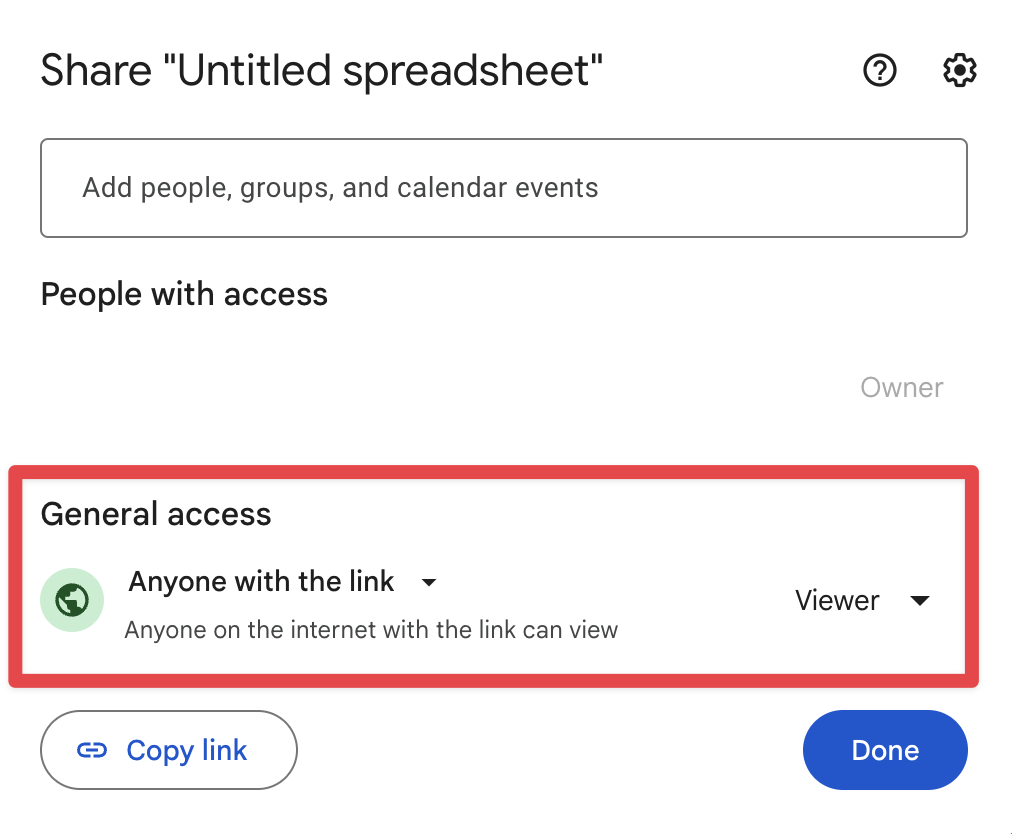
2
Click on the Paper Clip and select Google Sheet

3
Paste the URL of your Google Sheet
Ensure that the Sheets link follows this format:or the Drive link to the sheet follows this format:
4
Click Submit
Click the Submit button to connect your Google Sheet to Julius.
File Persistence Policy
- Free-tier users: Files are retained for up to 1 hour of inactivity, after which all uploaded and AI-generated files are deleted.
- Paid users: Files remain available for up to 7 days of inactivity.