> ## Documentation Index
> Fetch the complete documentation index at: https://julius.ai/docs/llms.txt
> Use this file to discover all available pages before exploring further.
# Overview
> Create and customize AI agents tailored to your specific workflows, data, and business needs.
## What is a Custom Agent?
A **Custom Agent** is your personalized AI assistant that you can train to work exactly how you need it to. Think of it as teaching Julius your specific workflows, company context, and preferred approaches to analysis. Once configured, your custom agent applies this knowledge consistently across all your conversations.
 Custom agents are perfect for repeated workflows, specialized analysis tasks, or ensuring consistent approaches across your team.
## Key Features
* **Knowledge Base:** Provide context about your company, data structure, or domain-specific information (up to 10,000 characters)
* **Custom Instructions:** Define how the agent should approach analysis and what to prioritize
* **Training Tasks:** Teach your agent specific tasks with example questions and approaches
* **Behavior Control:** Adjust response length from short and concise to detailed and comprehensive
* **Output Preferences:** Set whether your agent prioritizes visualizations, data frames, or insights
* **Team Sharing:** Share your custom agents with team members for consistent analysis across your organization
* **Template Library:** Use pre-built agents or publish your own as templates
## Benefits of Custom Agents
* **Consistency:** Get the same quality of analysis every time, following your preferred methodology
* **Efficiency:** Skip repetitive instructions - your agent already knows how you work
* **Domain Expertise:** Embed industry or company-specific knowledge directly into your AI assistant
* **Team Alignment:** Share agents across your team to ensure everyone follows the same analytical standards
* **Time Savings:** Train once, use everywhere. No need to repeat context in every conversation
## How Custom Agents Work
Your custom agent's knowledge and instructions are automatically applied to every message you send:
1. **You configure** your agent with instructions, knowledge base, and training examples
2. **Julius reads** the relevant parts of your configuration based on your question
3. **The agent applies** your guidelines to provide tailored, consistent responses
4. **You refine** the agent over time as you discover new best practices
Custom agents work with data connectors, notebooks, and all other Julius features. Your agent applies its knowledge regardless of where you're working.
## Getting to Custom Agents
There are two ways to access your custom agents:
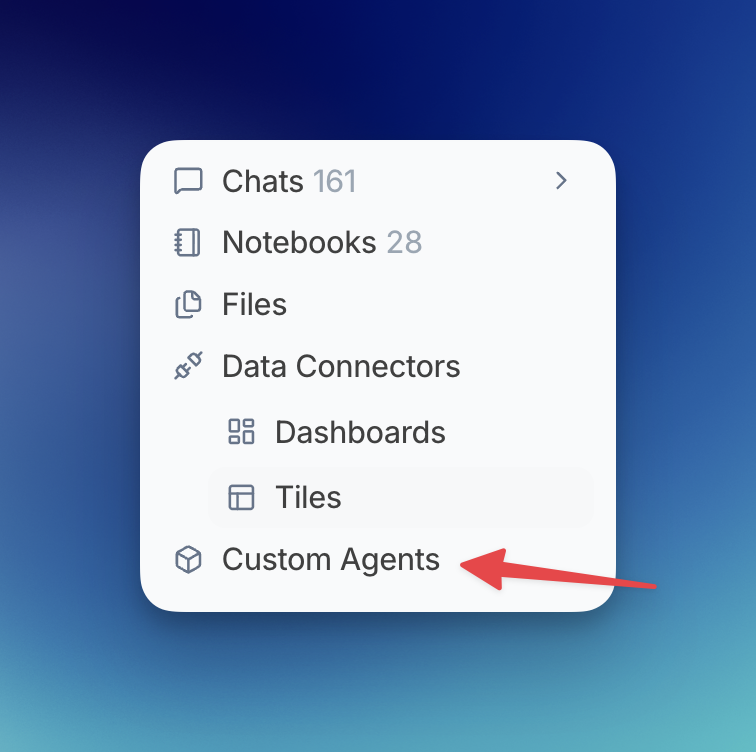
1. **From the sidebar menu:** Click on **Custom Agents** in your left sidebar
2. **Direct link:** Navigate to [julius.ai/custom-agents](https://julius.ai/custom-agents)
## Helping Your Team
Custom agents let less experienced team members perform complex analysis with confidence. Here's how it works:
**You (the expert):**
* Create a custom agent with detailed instructions and training tasks
* Embed your expertise into the agent's knowledge base
* Define the exact methodology and best practices
* Configure output preferences to match your standards
**Your team members:**
* Simply activate the agent and ask questions naturally
* Get consistent, high-quality analysis without needing to know the technical details
* Follow established methodologies automatically
* Produce work that meets your team's standards
**Example:** A data analyst creates a "Sales Reporting Agent" with specific SQL patterns, metric definitions, and visualization preferences. Now, marketing team members can generate accurate sales reports by simply asking "Show me Q3 performance by region" - the agent handles all the complexity.
This scales expertise across your organization and reduces the learning curve for new team members.
## Getting Started
Ready to create your first custom agent? Follow our step-by-step guide to build an agent tailored to your needs.
Learn how to configure and train your first custom agent
Activate and work with your custom agents
Collaborate by sharing agents with your team
***
Need help or have questions? Contact [**team@julius.ai**](mailto:team@julius.ai) for support with custom agents.
Custom agents are perfect for repeated workflows, specialized analysis tasks, or ensuring consistent approaches across your team.
## Key Features
* **Knowledge Base:** Provide context about your company, data structure, or domain-specific information (up to 10,000 characters)
* **Custom Instructions:** Define how the agent should approach analysis and what to prioritize
* **Training Tasks:** Teach your agent specific tasks with example questions and approaches
* **Behavior Control:** Adjust response length from short and concise to detailed and comprehensive
* **Output Preferences:** Set whether your agent prioritizes visualizations, data frames, or insights
* **Team Sharing:** Share your custom agents with team members for consistent analysis across your organization
* **Template Library:** Use pre-built agents or publish your own as templates
## Benefits of Custom Agents
* **Consistency:** Get the same quality of analysis every time, following your preferred methodology
* **Efficiency:** Skip repetitive instructions - your agent already knows how you work
* **Domain Expertise:** Embed industry or company-specific knowledge directly into your AI assistant
* **Team Alignment:** Share agents across your team to ensure everyone follows the same analytical standards
* **Time Savings:** Train once, use everywhere. No need to repeat context in every conversation
## How Custom Agents Work
Your custom agent's knowledge and instructions are automatically applied to every message you send:
1. **You configure** your agent with instructions, knowledge base, and training examples
2. **Julius reads** the relevant parts of your configuration based on your question
3. **The agent applies** your guidelines to provide tailored, consistent responses
4. **You refine** the agent over time as you discover new best practices
Custom agents work with data connectors, notebooks, and all other Julius features. Your agent applies its knowledge regardless of where you're working.
## Getting to Custom Agents
There are two ways to access your custom agents:
1. **From the sidebar menu:** Click on **Custom Agents** in your left sidebar
2. **Direct link:** Navigate to [julius.ai/custom-agents](https://julius.ai/custom-agents)
## Helping Your Team
Custom agents let less experienced team members perform complex analysis with confidence. Here's how it works:
**You (the expert):**
* Create a custom agent with detailed instructions and training tasks
* Embed your expertise into the agent's knowledge base
* Define the exact methodology and best practices
* Configure output preferences to match your standards
**Your team members:**
* Simply activate the agent and ask questions naturally
* Get consistent, high-quality analysis without needing to know the technical details
* Follow established methodologies automatically
* Produce work that meets your team's standards
**Example:** A data analyst creates a "Sales Reporting Agent" with specific SQL patterns, metric definitions, and visualization preferences. Now, marketing team members can generate accurate sales reports by simply asking "Show me Q3 performance by region" - the agent handles all the complexity.
This scales expertise across your organization and reduces the learning curve for new team members.
## Getting Started
Ready to create your first custom agent? Follow our step-by-step guide to build an agent tailored to your needs.
Learn how to configure and train your first custom agent
Activate and work with your custom agents
Collaborate by sharing agents with your team
***
Need help or have questions? Contact [**team@julius.ai**](mailto:team@julius.ai) for support with custom agents.